> ## Documentation Index
> Fetch the complete documentation index at: https://docs.braingrid.ai/llms.txt
> Use this file to discover all available pages before exploring further.
# Welcome to BrainGrid!
> Plan, specify, and build your AI coding projects.
Built for AI coders beyond the initial prototype, BrainGrid helps you:
* Build features without breaking things
* Tackle more complex functionality with structured plans
* Build a well-structured and more maintainable application
* Ship faster with less bug fixing and rework
## The Workflow
AI coding tools are powerful, but they struggle with vague instructions. They go off-track, miss requirements, and need constant hand-holding.
BrainGrid is like an AI Tech Lead that brings clarity and structure with **a proven workflow to ship reliable software.**
The workflow is simple, yet powerful:
Start with a rough idea, a high level concept, or a problem to solve.

 Click `Refine` to refine the rough idea with AI into a detailed specification.
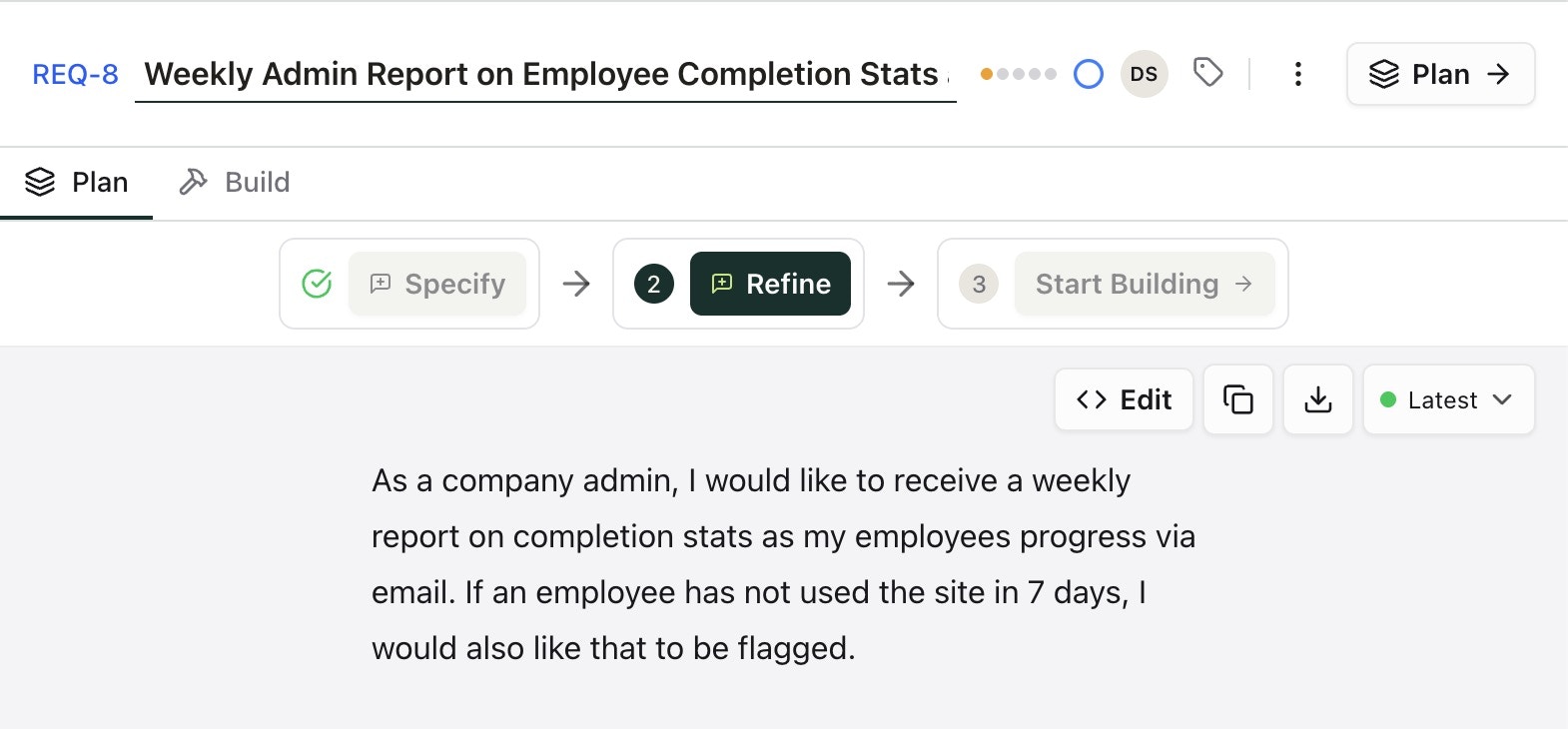
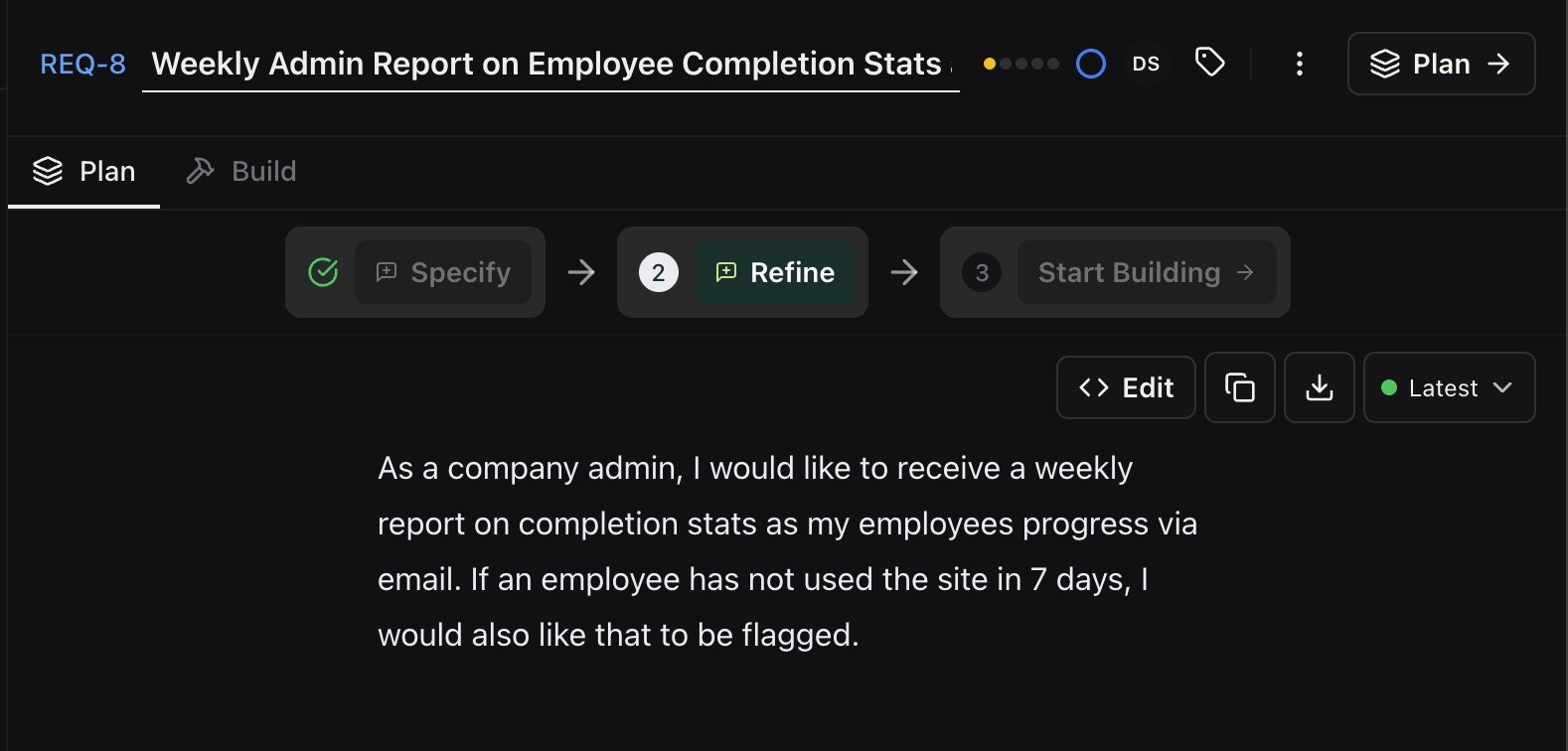 BrainGrid asks clarifying questions to define the scope and uncover edge cases.
Upon completion, the basic prompt is refined into a full technical requirement with feature requests. This can be edited manually, or work with the AI to update the requirement.
BrainGrid asks clarifying questions to define the scope and uncover edge cases.
Upon completion, the basic prompt is refined into a full technical requirement with feature requests. This can be edited manually, or work with the AI to update the requirement.
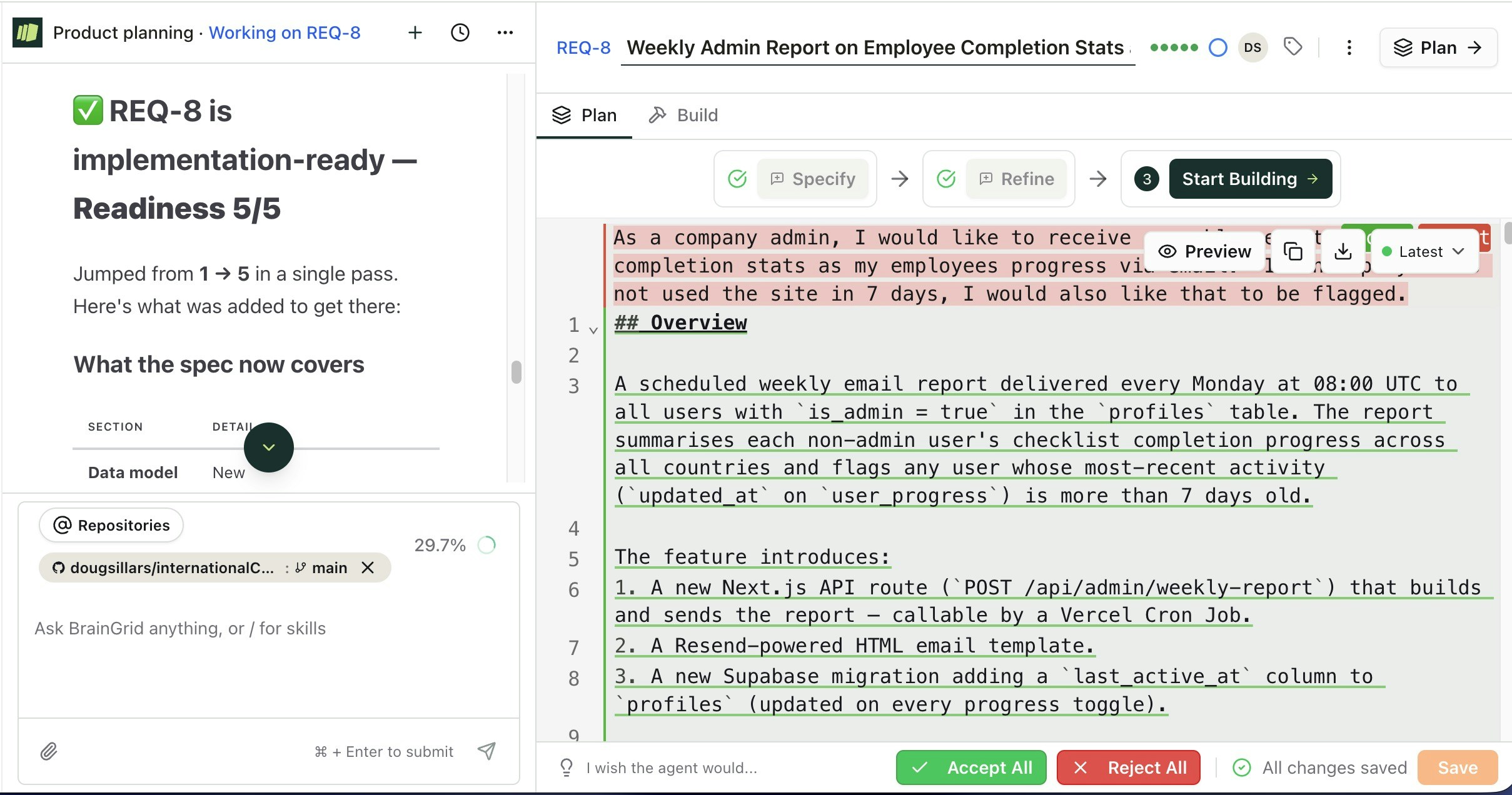
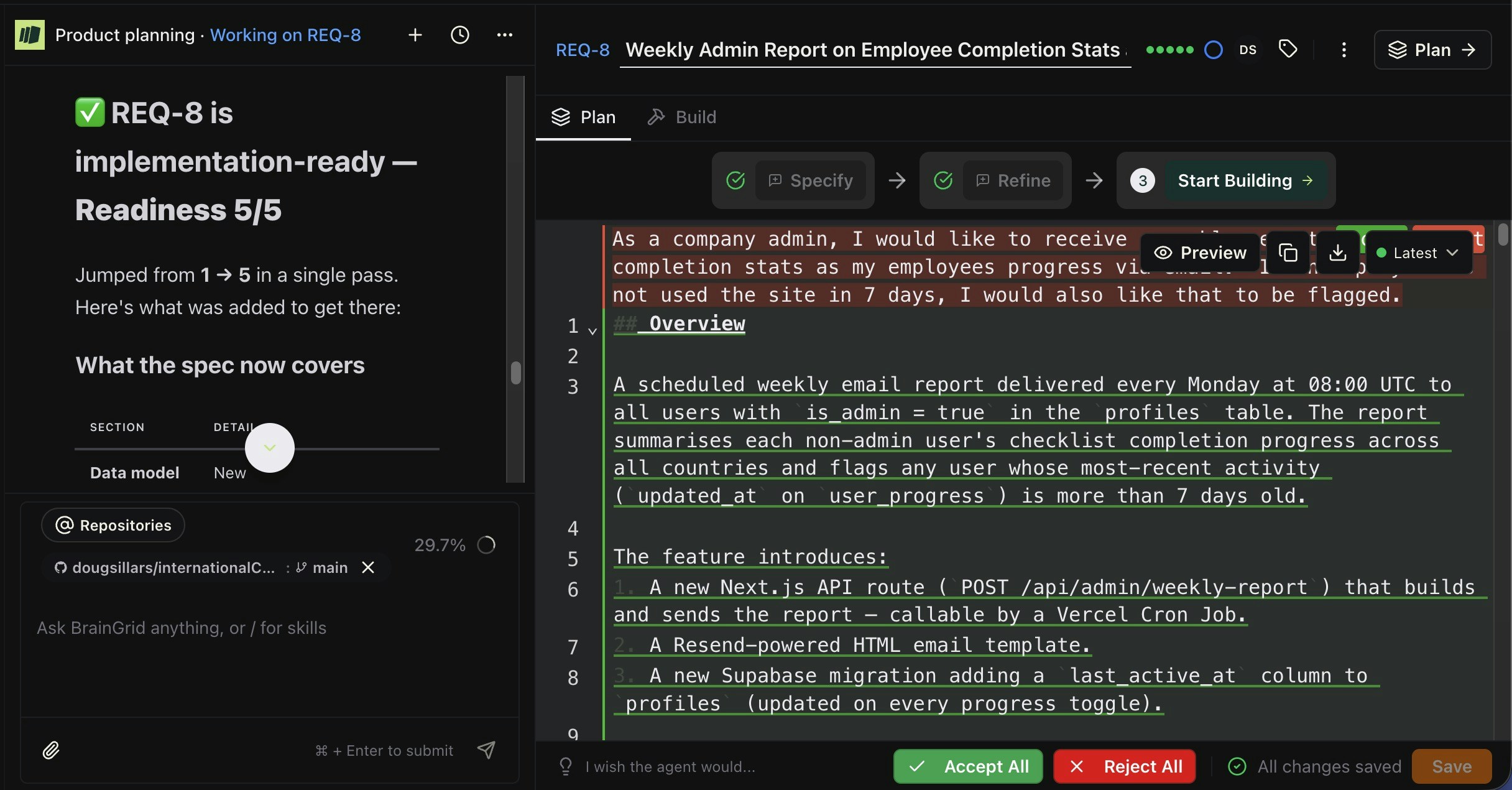 In this example, the simple prompt has been expanded to include:
* Overview
* Actors
* Data Model Changes
* 6 Functional Requirements
* API Contract
* New Files
* Environmental Variables
* 10 Acceptance Criteria
## Overview
A scheduled weekly email report delivered every Monday at 08:00 UTC to all users with `is_admin = true` in the `profiles` table. The report summarises each non-admin user's checklist completion progress across all countries and flags any user whose most-recent activity (`updated_at` on `user_progress`) is more than 7 days old.
The feature introduces:
1. A new Next.js API route (`POST /api/admin/weekly-report`) that builds and sends the report — callable by a Vercel Cron Job.
2. A Resend-powered HTML email template.
3. A new Supabase migration adding a `last_active_at` column to `profiles` (updated on every progress toggle).
***
## Actors
| Actor | Description |
| ----------------- | --------------------------------------------------------------------------------- |
| **Company Admin** | Any `profiles` row where `is_admin = true`. Receives the weekly email. |
| **Employee** | Any `profiles` row where `is_admin = false`. Appears as a data row in the report. |
| **Vercel Cron** | Infrastructure trigger that calls the report API every Monday at 08:00 UTC. |
***
## Data Model Changes
### Migration: `005_last_active_at.sql`
```sql theme={null}
ALTER TABLE public.profiles
ADD COLUMN IF NOT EXISTS last_active_at TIMESTAMPTZ;
```
* `last_active_at` is set to `NOW()` whenever a row in `user_progress` is inserted or updated for that user (via a new trigger `set_last_active_at` on `user_progress`).
* Existing rows default to `NULL` (treated as "never active" for inactivity logic).
### Trigger: `set_last_active_at`
Fires `AFTER INSERT OR UPDATE ON public.user_progress FOR EACH ROW`. Updates `profiles.last_active_at = NOW()` for the affected `user_id`.
***
## Functional Requirements
### FR-1 — Report Trigger
* A Vercel Cron Job defined in `vercel.json` calls `POST /api/admin/weekly-report` every Monday at 08:00 UTC.
* The route is protected by a `CRON_SECRET` environment variable. Requests without the header `Authorization: Bearer ` receive `401 Unauthorized`.
* The route can also be called manually by a super-admin for testing (same auth header).
### FR-2 — Employee Data Query
The API route uses the Supabase **service-role** client (bypasses RLS) to:
1. Fetch all employees: `SELECT id, email, full_name, last_active_at FROM profiles WHERE is_admin = false ORDER BY full_name ASC`.
2. For each employee, fetch aggregate progress across all countries:
```sql theme={null}
SELECT
COUNT(*) FILTER (WHERE completed = true) AS completed_count,
COUNT(*) AS total_items
FROM user_progress
WHERE user_id =
```
3. Compute `completion_percentage = ROUND(completed_count / total_items * 100)`. If `total_items = 0`, percentage is `0`.
4. Determine inactivity flag: `is_inactive = last_active_at IS NULL OR last_active_at < NOW() - INTERVAL '7 days'`.
### FR-3 — Admin Recipients
* Fetch all admins: `SELECT email, full_name FROM profiles WHERE is_admin = true`.
* Send one email per admin (individual `to:` addresses, not BCC).
* If no admins exist, log a warning and return `200` with `{ sent: 0 }`.
### FR-4 — Email Content
The HTML email contains the following sections in order:
#### 4a. Header
* App name: **International Concierge**
* Report title: "Weekly Employee Progress Report"
* Date range: "Week of \[Monday date] – \[Sunday date]" (ISO format: `DD MMM YYYY`)
#### 4b. Summary Row
A single-line summary above the table:
> "\[N] employees · \[X] inactive (no activity in 7+ days)"
#### 4c. Employee Progress Table
Columns: **Name**, **Email**, **Items Completed**, **Total Items**, **Completion %**, **Last Active**, **Status**
* Rows are sorted: inactive employees first (alphabetically), then active employees (alphabetically).
* **Last Active** cell: formatted as `DD MMM YYYY` if `last_active_at` is set; otherwise displays `—`.
* **Status** cell:
* Inactive (never active or >7 days): red badge label `⚠ Inactive`
* Active (activity within 7 days): green badge label `✓ Active`
#### 4d. Footer
* Static text: "This report is sent automatically every Monday. Log in to International Concierge to view detailed progress."
* Link to the admin dashboard (configured via `NEXT_PUBLIC_APP_URL` env var).
### FR-5 — Email Sending
* Use **Resend** (`resend` npm package) with API key stored in `RESEND_API_KEY` env var.
* `from:` address: `reports@` (stored in `REPORT_FROM_EMAIL` env var).
* `subject:` `"International Concierge — Weekly Report ([DD MMM YYYY])"`
* Email is HTML with a plain-text fallback.
* If Resend returns an error for one admin, log the error and continue sending to remaining admins. Return a partial-success response.
### FR-6 — Edge Cases
| Scenario | Behaviour |
| ------------------------------------------ | --------------------------------------------------------------------------------------- |
| No employees (`is_admin = false` rows = 0) | Send email with empty table and summary "0 employees · 0 inactive" |
| No admins (`is_admin = true` rows = 0) | Skip sending; API returns `{ sent: 0, reason: "no_admins" }` with HTTP 200 |
| Employee has no `user_progress` rows | `completed_count = 0`, `total_items = 0`, `completion_percentage = 0`, flagged inactive |
| `last_active_at` is NULL | Treated as inactive (never used the site) |
| Resend API failure for one admin | Log error, continue to next admin, return `{ sent: N, errors: [...] }` |
| Cron called with wrong/missing secret | Return `401 Unauthorized`, do not send any emails |
***
## API Contract
### `POST /api/admin/weekly-report`
**Request Headers:**
```
Authorization: Bearer
```
**Response — Success:**
```json theme={null}
{
"sent": 2,
"employees": 14,
"inactive": 3
}
```
**Response — No admins:**
```json theme={null}
{ "sent": 0, "reason": "no_admins" }
```
**Response — Partial failure:**
```json theme={null}
{
"sent": 1,
"errors": [{ "admin": "admin@example.com", "error": "Resend API error" }]
}
```
**Response — Unauthorized:**
```
HTTP 401
{ "error": "Unauthorized" }
```
***
## New Files
| File | Purpose |
| -------------------------------------------- | ------------------------------------------------------ |
| `supabase/migrations/005_last_active_at.sql` | Adds `last_active_at` column + trigger |
| `src/app/api/admin/weekly-report/route.ts` | Cron-triggered report API route |
| `src/lib/email/weeklyReport.ts` | HTML email template builder (returns `{ html, text }`) |
| `vercel.json` | Cron schedule definition |
### `vercel.json` snippet
```json theme={null}
{
"crons": [
{
"path": "/api/admin/weekly-report",
"schedule": "0 8 * * 1"
}
]
}
```
***
## Environment Variables
| Variable | Description |
| --------------------- | --------------------------------------------------------- |
| `CRON_SECRET` | Shared secret for authenticating cron requests |
| `RESEND_API_KEY` | Resend API key for sending emails |
| `REPORT_FROM_EMAIL` | Sender address, e.g. `reports@internationalconcierge.com` |
| `NEXT_PUBLIC_APP_URL` | Base URL for dashboard link in email footer |
***
## Acceptance Criteria
### AC-1: Cron Authentication
* **Given** a POST request to `/api/admin/weekly-report` without the `Authorization` header
* **When** the request is processed
* **Then** the API returns HTTP `401` and no emails are sent
* **Given** a POST request with `Authorization: Bearer wrong-secret`
* **When** the request is processed
* **Then** the API returns HTTP `401` and no emails are sent
* **Given** a POST request with the correct `Authorization: Bearer `
* **When** the request is processed
* **Then** the API proceeds to build and send the report
### AC-2: Employee Progress Aggregation
* **Given** employee Alice has completed 8 of 10 checklist items across all countries
* **When** the report is generated
* **Then** Alice's row shows `completed_count = 8`, `total_items = 10`, `completion_percentage = 80%`
* **Given** employee Bob has no `user_progress` rows
* **When** the report is generated
* **Then** Bob's row shows `completed_count = 0`, `total_items = 0`, `completion_percentage = 0%`
### AC-3: Inactivity Flagging
* **Given** employee Carol's `last_active_at` is 8 days ago
* **When** the report is generated
* **Then** Carol's row shows the `⚠ Inactive` status badge
* **Given** employee Dave's `last_active_at` is NULL (never logged in)
* **When** the report is generated
* **Then** Dave's row shows the `⚠ Inactive` status badge
* **Given** employee Eve's `last_active_at` is 3 days ago
* **When** the report is generated
* **Then** Eve's row shows the `✓ Active` status badge
### AC-4: last\_active\_at Updates
* **Given** employee Frank toggles a checklist item (insert or update on `user_progress`)
* **When** the database trigger fires
* **Then** `profiles.last_active_at` for Frank is updated to the current timestamp
### AC-5: Email Delivery
* **Given** there are 2 admins and 5 employees
* **When** the report API is called with a valid secret
* **Then** 2 separate emails are sent (one per admin), each containing a table with 5 employee rows
* **And** the API returns `{ "sent": 2, "employees": 5, "inactive": }`
### AC-6: Email Content
* **Given** the report email is generated
* **When** the email is rendered
* **Then** the subject line matches `"International Concierge — Weekly Report ([DD MMM YYYY])"`
* **And** the header shows the correct week date range (Monday–Sunday)
* **And** inactive employees appear before active employees in the table
* **And** the footer contains a working link to `NEXT_PUBLIC_APP_URL/admin`
### AC-7: No Admins Edge Case
* **Given** no profiles have `is_admin = true`
* **When** the report API is called
* **Then** no emails are sent and the API returns `{ "sent": 0, "reason": "no_admins" }` with HTTP `200`
### AC-8: No Employees Edge Case
* **Given** all profiles have `is_admin = true` (zero employees)
* **When** the report API is called
* **Then** emails are sent to all admins with an empty table and summary "0 employees · 0 inactive"
### AC-9: Resend Partial Failure
* **Given** there are 2 admins and Resend fails for the second admin's email
* **When** the report API is called
* **Then** the first admin's email is sent successfully
* **And** the error for the second admin is logged
* **And** the API returns `{ "sent": 1, "errors": [{ "admin": "...", "error": "..." }] }`
### AC-10: Cron Schedule
* **Given** `vercel.json` is deployed with the cron configuration
* **When** Monday 08:00 UTC arrives
* **Then** Vercel automatically calls `POST /api/admin/weekly-report` with the correct `Authorization` header (configured via Vercel environment variables)
Automatically build the requirement with your AI coding tool.
You can feed tasks via the [MCP](/mcp-server/overview), [CLI](/cli/overview), or just copy paste them into your AI coding tool.
```bash Claude Code or Cursor theme={null}
/build REQ-8
```
BrainGrid and your AI coding tool will build the code required to complete the requirement. Under the hood:
* New GitHub branch
* Tasks are created
``Install the `resend` npm package. Create a service-role Supabase client at `src/lib/supabase/service-role.ts` that uses SUPABASE_SERVICE_ROLE_KEY to bypass RLS. Document required env vars: RESEND_API_KEY, CRON_SECRET, REPORT_FROM_EMAIL, SUPABASE_SERVICE_ROLE_KEY.``
Create `src/lib/email/weeklyReport.ts` with a pure function `buildWeeklyReportHtml(employees, period)` that returns an HTML string. Must include: header with app name and report period, summary row (total employees, completions, inactive count), employee table sorted alphabetically (Name, Country, Items Completed/Total, Completion %, Last Active, Status badge), footer. Handle empty states: no employees message, no country shows "—", inactive employees get ⚠️ badge. Include inline styles only, no external CSS.
Create `src/app/api/cron/weekly-report/route.ts` with POST handler that:
1 Validates Authorization Bearer CRON\_SECRET (401 if invalid)
2 Queries all non-admin employees with completion stats using service-role Supabase client
3 Queries all admins (is\_admin=true)
4 Builds HTML email using buildWeeklyReportHtml
5 Sends email to each admin via Resend
6 Returns 200 with sent, employees count. Handle edge cases: no admins (log report\_skipped), no employees (send empty-state email), Supabase failure (500), Resend partial failure (log error, continue). Implement structured logging: cron\_started, report\_sent, report\_skipped, cron\_error.
Create `vercel.json` with cron configuration: path "/api/cron/weekly-report", schedule "0 8 \* \* 1" (every Monday at 08:00 UTC).
* Completes the coding for the tasks.
* Updates BrainGrid with the tasks shown as completed.
In this example, the simple prompt has been expanded to include:
* Overview
* Actors
* Data Model Changes
* 6 Functional Requirements
* API Contract
* New Files
* Environmental Variables
* 10 Acceptance Criteria
## Overview
A scheduled weekly email report delivered every Monday at 08:00 UTC to all users with `is_admin = true` in the `profiles` table. The report summarises each non-admin user's checklist completion progress across all countries and flags any user whose most-recent activity (`updated_at` on `user_progress`) is more than 7 days old.
The feature introduces:
1. A new Next.js API route (`POST /api/admin/weekly-report`) that builds and sends the report — callable by a Vercel Cron Job.
2. A Resend-powered HTML email template.
3. A new Supabase migration adding a `last_active_at` column to `profiles` (updated on every progress toggle).
***
## Actors
| Actor | Description |
| ----------------- | --------------------------------------------------------------------------------- |
| **Company Admin** | Any `profiles` row where `is_admin = true`. Receives the weekly email. |
| **Employee** | Any `profiles` row where `is_admin = false`. Appears as a data row in the report. |
| **Vercel Cron** | Infrastructure trigger that calls the report API every Monday at 08:00 UTC. |
***
## Data Model Changes
### Migration: `005_last_active_at.sql`
```sql theme={null}
ALTER TABLE public.profiles
ADD COLUMN IF NOT EXISTS last_active_at TIMESTAMPTZ;
```
* `last_active_at` is set to `NOW()` whenever a row in `user_progress` is inserted or updated for that user (via a new trigger `set_last_active_at` on `user_progress`).
* Existing rows default to `NULL` (treated as "never active" for inactivity logic).
### Trigger: `set_last_active_at`
Fires `AFTER INSERT OR UPDATE ON public.user_progress FOR EACH ROW`. Updates `profiles.last_active_at = NOW()` for the affected `user_id`.
***
## Functional Requirements
### FR-1 — Report Trigger
* A Vercel Cron Job defined in `vercel.json` calls `POST /api/admin/weekly-report` every Monday at 08:00 UTC.
* The route is protected by a `CRON_SECRET` environment variable. Requests without the header `Authorization: Bearer ` receive `401 Unauthorized`.
* The route can also be called manually by a super-admin for testing (same auth header).
### FR-2 — Employee Data Query
The API route uses the Supabase **service-role** client (bypasses RLS) to:
1. Fetch all employees: `SELECT id, email, full_name, last_active_at FROM profiles WHERE is_admin = false ORDER BY full_name ASC`.
2. For each employee, fetch aggregate progress across all countries:
```sql theme={null}
SELECT
COUNT(*) FILTER (WHERE completed = true) AS completed_count,
COUNT(*) AS total_items
FROM user_progress
WHERE user_id =
```
3. Compute `completion_percentage = ROUND(completed_count / total_items * 100)`. If `total_items = 0`, percentage is `0`.
4. Determine inactivity flag: `is_inactive = last_active_at IS NULL OR last_active_at < NOW() - INTERVAL '7 days'`.
### FR-3 — Admin Recipients
* Fetch all admins: `SELECT email, full_name FROM profiles WHERE is_admin = true`.
* Send one email per admin (individual `to:` addresses, not BCC).
* If no admins exist, log a warning and return `200` with `{ sent: 0 }`.
### FR-4 — Email Content
The HTML email contains the following sections in order:
#### 4a. Header
* App name: **International Concierge**
* Report title: "Weekly Employee Progress Report"
* Date range: "Week of \[Monday date] – \[Sunday date]" (ISO format: `DD MMM YYYY`)
#### 4b. Summary Row
A single-line summary above the table:
> "\[N] employees · \[X] inactive (no activity in 7+ days)"
#### 4c. Employee Progress Table
Columns: **Name**, **Email**, **Items Completed**, **Total Items**, **Completion %**, **Last Active**, **Status**
* Rows are sorted: inactive employees first (alphabetically), then active employees (alphabetically).
* **Last Active** cell: formatted as `DD MMM YYYY` if `last_active_at` is set; otherwise displays `—`.
* **Status** cell:
* Inactive (never active or >7 days): red badge label `⚠ Inactive`
* Active (activity within 7 days): green badge label `✓ Active`
#### 4d. Footer
* Static text: "This report is sent automatically every Monday. Log in to International Concierge to view detailed progress."
* Link to the admin dashboard (configured via `NEXT_PUBLIC_APP_URL` env var).
### FR-5 — Email Sending
* Use **Resend** (`resend` npm package) with API key stored in `RESEND_API_KEY` env var.
* `from:` address: `reports@` (stored in `REPORT_FROM_EMAIL` env var).
* `subject:` `"International Concierge — Weekly Report ([DD MMM YYYY])"`
* Email is HTML with a plain-text fallback.
* If Resend returns an error for one admin, log the error and continue sending to remaining admins. Return a partial-success response.
### FR-6 — Edge Cases
| Scenario | Behaviour |
| ------------------------------------------ | --------------------------------------------------------------------------------------- |
| No employees (`is_admin = false` rows = 0) | Send email with empty table and summary "0 employees · 0 inactive" |
| No admins (`is_admin = true` rows = 0) | Skip sending; API returns `{ sent: 0, reason: "no_admins" }` with HTTP 200 |
| Employee has no `user_progress` rows | `completed_count = 0`, `total_items = 0`, `completion_percentage = 0`, flagged inactive |
| `last_active_at` is NULL | Treated as inactive (never used the site) |
| Resend API failure for one admin | Log error, continue to next admin, return `{ sent: N, errors: [...] }` |
| Cron called with wrong/missing secret | Return `401 Unauthorized`, do not send any emails |
***
## API Contract
### `POST /api/admin/weekly-report`
**Request Headers:**
```
Authorization: Bearer
```
**Response — Success:**
```json theme={null}
{
"sent": 2,
"employees": 14,
"inactive": 3
}
```
**Response — No admins:**
```json theme={null}
{ "sent": 0, "reason": "no_admins" }
```
**Response — Partial failure:**
```json theme={null}
{
"sent": 1,
"errors": [{ "admin": "admin@example.com", "error": "Resend API error" }]
}
```
**Response — Unauthorized:**
```
HTTP 401
{ "error": "Unauthorized" }
```
***
## New Files
| File | Purpose |
| -------------------------------------------- | ------------------------------------------------------ |
| `supabase/migrations/005_last_active_at.sql` | Adds `last_active_at` column + trigger |
| `src/app/api/admin/weekly-report/route.ts` | Cron-triggered report API route |
| `src/lib/email/weeklyReport.ts` | HTML email template builder (returns `{ html, text }`) |
| `vercel.json` | Cron schedule definition |
### `vercel.json` snippet
```json theme={null}
{
"crons": [
{
"path": "/api/admin/weekly-report",
"schedule": "0 8 * * 1"
}
]
}
```
***
## Environment Variables
| Variable | Description |
| --------------------- | --------------------------------------------------------- |
| `CRON_SECRET` | Shared secret for authenticating cron requests |
| `RESEND_API_KEY` | Resend API key for sending emails |
| `REPORT_FROM_EMAIL` | Sender address, e.g. `reports@internationalconcierge.com` |
| `NEXT_PUBLIC_APP_URL` | Base URL for dashboard link in email footer |
***
## Acceptance Criteria
### AC-1: Cron Authentication
* **Given** a POST request to `/api/admin/weekly-report` without the `Authorization` header
* **When** the request is processed
* **Then** the API returns HTTP `401` and no emails are sent
* **Given** a POST request with `Authorization: Bearer wrong-secret`
* **When** the request is processed
* **Then** the API returns HTTP `401` and no emails are sent
* **Given** a POST request with the correct `Authorization: Bearer `
* **When** the request is processed
* **Then** the API proceeds to build and send the report
### AC-2: Employee Progress Aggregation
* **Given** employee Alice has completed 8 of 10 checklist items across all countries
* **When** the report is generated
* **Then** Alice's row shows `completed_count = 8`, `total_items = 10`, `completion_percentage = 80%`
* **Given** employee Bob has no `user_progress` rows
* **When** the report is generated
* **Then** Bob's row shows `completed_count = 0`, `total_items = 0`, `completion_percentage = 0%`
### AC-3: Inactivity Flagging
* **Given** employee Carol's `last_active_at` is 8 days ago
* **When** the report is generated
* **Then** Carol's row shows the `⚠ Inactive` status badge
* **Given** employee Dave's `last_active_at` is NULL (never logged in)
* **When** the report is generated
* **Then** Dave's row shows the `⚠ Inactive` status badge
* **Given** employee Eve's `last_active_at` is 3 days ago
* **When** the report is generated
* **Then** Eve's row shows the `✓ Active` status badge
### AC-4: last\_active\_at Updates
* **Given** employee Frank toggles a checklist item (insert or update on `user_progress`)
* **When** the database trigger fires
* **Then** `profiles.last_active_at` for Frank is updated to the current timestamp
### AC-5: Email Delivery
* **Given** there are 2 admins and 5 employees
* **When** the report API is called with a valid secret
* **Then** 2 separate emails are sent (one per admin), each containing a table with 5 employee rows
* **And** the API returns `{ "sent": 2, "employees": 5, "inactive": }`
### AC-6: Email Content
* **Given** the report email is generated
* **When** the email is rendered
* **Then** the subject line matches `"International Concierge — Weekly Report ([DD MMM YYYY])"`
* **And** the header shows the correct week date range (Monday–Sunday)
* **And** inactive employees appear before active employees in the table
* **And** the footer contains a working link to `NEXT_PUBLIC_APP_URL/admin`
### AC-7: No Admins Edge Case
* **Given** no profiles have `is_admin = true`
* **When** the report API is called
* **Then** no emails are sent and the API returns `{ "sent": 0, "reason": "no_admins" }` with HTTP `200`
### AC-8: No Employees Edge Case
* **Given** all profiles have `is_admin = true` (zero employees)
* **When** the report API is called
* **Then** emails are sent to all admins with an empty table and summary "0 employees · 0 inactive"
### AC-9: Resend Partial Failure
* **Given** there are 2 admins and Resend fails for the second admin's email
* **When** the report API is called
* **Then** the first admin's email is sent successfully
* **And** the error for the second admin is logged
* **And** the API returns `{ "sent": 1, "errors": [{ "admin": "...", "error": "..." }] }`
### AC-10: Cron Schedule
* **Given** `vercel.json` is deployed with the cron configuration
* **When** Monday 08:00 UTC arrives
* **Then** Vercel automatically calls `POST /api/admin/weekly-report` with the correct `Authorization` header (configured via Vercel environment variables)
Automatically build the requirement with your AI coding tool.
You can feed tasks via the [MCP](/mcp-server/overview), [CLI](/cli/overview), or just copy paste them into your AI coding tool.
```bash Claude Code or Cursor theme={null}
/build REQ-8
```
BrainGrid and your AI coding tool will build the code required to complete the requirement. Under the hood:
* New GitHub branch
* Tasks are created
``Install the `resend` npm package. Create a service-role Supabase client at `src/lib/supabase/service-role.ts` that uses SUPABASE_SERVICE_ROLE_KEY to bypass RLS. Document required env vars: RESEND_API_KEY, CRON_SECRET, REPORT_FROM_EMAIL, SUPABASE_SERVICE_ROLE_KEY.``
Create `src/lib/email/weeklyReport.ts` with a pure function `buildWeeklyReportHtml(employees, period)` that returns an HTML string. Must include: header with app name and report period, summary row (total employees, completions, inactive count), employee table sorted alphabetically (Name, Country, Items Completed/Total, Completion %, Last Active, Status badge), footer. Handle empty states: no employees message, no country shows "—", inactive employees get ⚠️ badge. Include inline styles only, no external CSS.
Create `src/app/api/cron/weekly-report/route.ts` with POST handler that:
1 Validates Authorization Bearer CRON\_SECRET (401 if invalid)
2 Queries all non-admin employees with completion stats using service-role Supabase client
3 Queries all admins (is\_admin=true)
4 Builds HTML email using buildWeeklyReportHtml
5 Sends email to each admin via Resend
6 Returns 200 with sent, employees count. Handle edge cases: no admins (log report\_skipped), no employees (send empty-state email), Supabase failure (500), Resend partial failure (log error, continue). Implement structured logging: cron\_started, report\_sent, report\_skipped, cron\_error.
Create `vercel.json` with cron configuration: path "/api/cron/weekly-report", schedule "0 8 \* \* 1" (every Monday at 08:00 UTC).
* Completes the coding for the tasks.
* Updates BrainGrid with the tasks shown as completed.
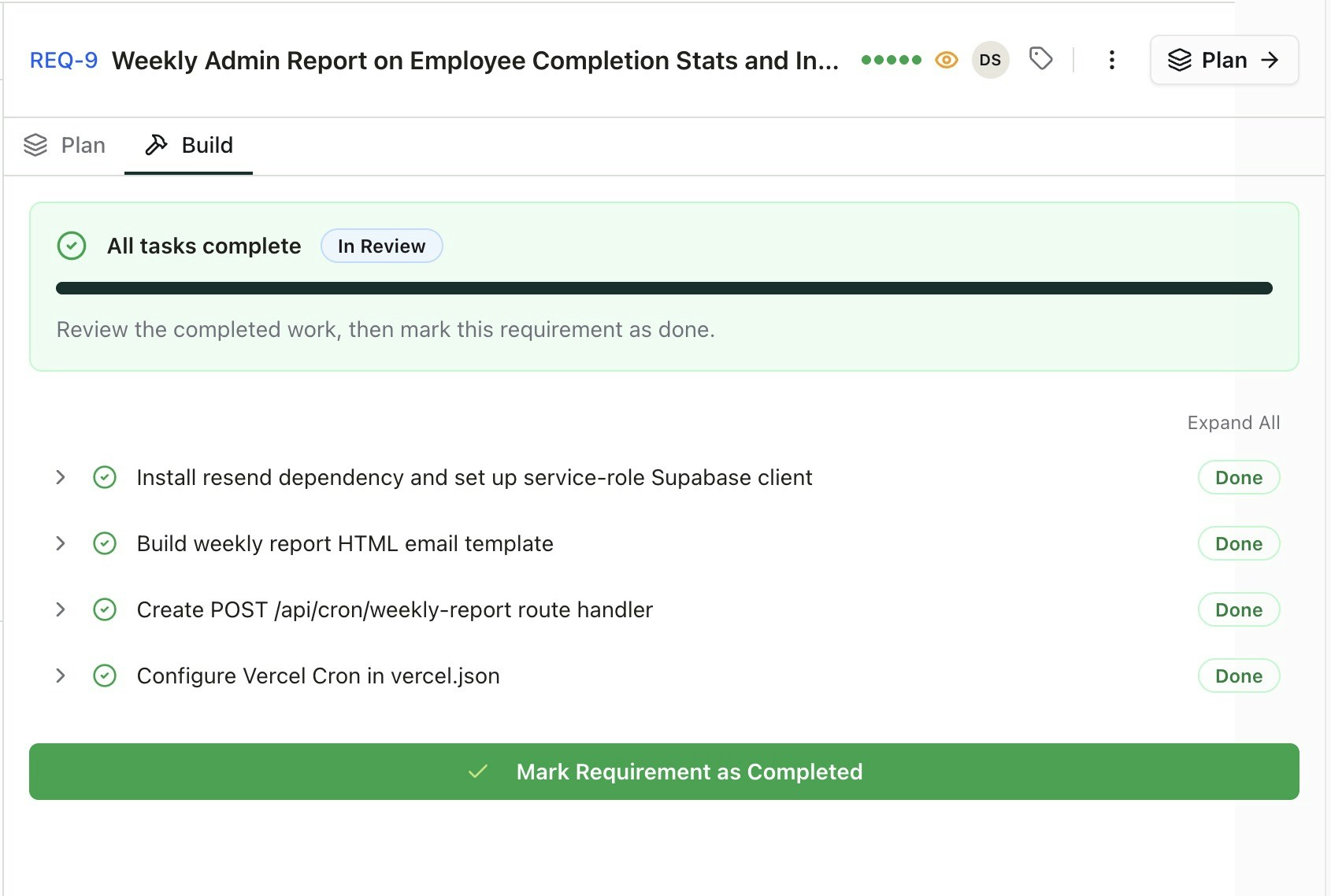
 * Commits the code to the Github repository.
Each stage adds structure, so by the time your AI starts coding, it knows exactly what to build and how to verify it's correct.
## Getting Started
Step by step guide to get started in minutes
Start working on new or existing projects.
* Commits the code to the Github repository.
Each stage adds structure, so by the time your AI starts coding, it knows exactly what to build and how to verify it's correct.
## Getting Started
Step by step guide to get started in minutes
Start working on new or existing projects.