> ## Documentation Index
> Fetch the complete documentation index at: https://docs.braingrid.ai/llms.txt
> Use this file to discover all available pages before exploring further.
# 2025 Changelog
> Product updates and improvements
## New Features
** The Agent is now branch-aware** - The agent's search, read, and list files tools now respect the selected GitHub branch. No more accidentally reading from main when you're working on a feature branch.
***
** Smart codebase context** - The agent starts with just the codebase summary (\~80% smaller initial context) and fetches Directory Structure, Data Model, Architecture, and Key Workflows on demand. Prevents context overflow on large codebases.
***
** CLI: Create branches** - `braingrid requirement create-branch` creates git branches via GitHub API. Auto-generates branch names in the format `{username}/REQ-123-slugified-name`. No need to manually format branch names.
```bash theme={null}
braingrid requirement create-branch
```
***
** CLI: Specify tasks** - `braingrid task specify "Add error handling"` creates a single task using AI. Works on requirements that already have tasks. Context-aware: understands existing task dependencies.
```bash theme={null}
braingrid task specify "Add error handling"
```
***
** CLI: Review PRs** - `braingrid requirement review` streams AI-powered acceptance reviews. Auto-detects PR from current branch. Falls back to interactive prompt if no PR found.
```bash theme={null}
braingrid requirement review
```
***
## Improvements
* **Circular context indicator** - New circular indicator replaces horizontal progress bar. Hover shows token breakdown by category.
* **CLI: Task auto-detection** - `task show` and `task update` work without task ID. Uses first in-progress or planned task.
* **CLI: Claude Code status line shows current task** - Status line now shows: `PROJ-X > REQ-Y > TASK-Z [completed/total]` with git branch.
* **CLI: Update notifications** - Warns when newer version available with interactive update prompt.
* **CLI: Shell tab completion** - Run `braingrid completion --setup` for bash/zsh autocomplete.
* **CLI: Requirement auto-detection for tasks** - Task commands detect requirement from branch name (e.g., `feature/REQ-123-something`).
* **CLI: Format options** - `--format json|xml|markdown|table` for `requirement show` and `task show`.
***
## Fixes
* **Filter documents by branch** - Analysis documents now filter correctly by branch.
* **Repository renamed handling** - When you rename a repo on GitHub, BrainGrid updates automatically.
* **Editor overflow** - Fixed content overflow in requirement editor.
* **Cleaner requirement UI** - Removed metadata clutter and moved title to header.
***
## New Features
** Message actions & feedback** - Take control of your conversations with the agent:
* **Copy** any message to clipboard with one click
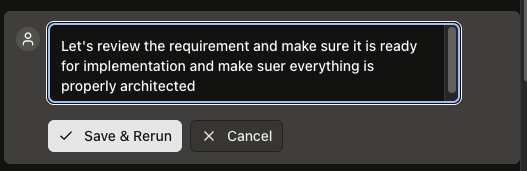
* **Edit** any of your messages (not just the most recent)
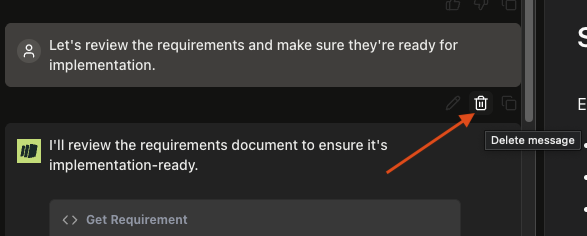
* **Delete** user messages to continue the conversation from that point
* **Rate responses** with thumbs up/down for better feedback
Agent message actions appear on the last message in each group, keeping the interface clean while giving you control when you need it.
Useful when:
* You want to go back to a previous point in the conversation. You can delete the message and start over from there.
 * You want to tweak a message you sent earlier.
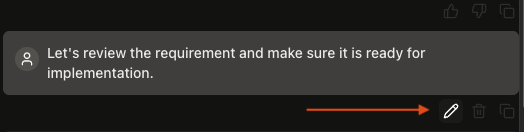 You can edit the message and start over from there.
 ***
** Connect repository to existing projects** - Link a GitHub repository to projects you've already created. Previously, you had to delete and recreate a project to add repo integration. Now:
* Go to project settings to connect a repository
* Automatic code analysis starts when you connect
* Repository becomes read-only once linked (prevents accidental changes)
***
## Improvements
* **Type while agent streams** - The input box stays enabled while the agent is thinking or streaming a response. Compose your next message while waiting instead of watching the agent work.
* **MCP tool improvements** - Added task deletion tool and git branch creation tool to the MCP server. The server now requires `project_id` explicitly for better clarity in server mode deployments.
* **Smarter task dependency validation** - Circular dependencies are now detected before saving, and cancelled tasks no longer incorrectly block other tasks from being updated.
***
## Fixes
* **Race condition in requirement updates** - Fixed 500 errors when a requirement was deleted while being updated. Now returns a proper 404 with a helpful message.
* **Consistent error responses** - Fixed cases where missing requirements returned 500 instead of 404, making it easier to understand what went wrong.
* **CLI skill installation** - Fixed issue where Claude Code skills were installed to a nested directory instead of the correct flat structure.
* **CLI organization ID** - Fixed issue where `.braingrid/project.json` stored "default" instead of the actual organization UUID, which could cause authentication issues.
***
## New Features
**GitHub branch-aware code reading** - The agent can now read code from any branch, not just main:
* Read files from specific branches, tags, or commits
* Compare implementations across releases
* Reference code from feature branches
* Example: "Show me auth.ts from the feature/auth-improvements branch"
***
## Improvements
* **Better Accept/Reject UI for accepting edits** - Improved bottom bar in the agent UI, making it easier to accept or reject edits.
* **Branch selector in workflows** - Added branch selector to the new requirement workflows to easily provide the right branch as context.
***
## Fixes
* **Task update errors** - Fixed 500 errors when updating tasks in unfunded organizations - now returns proper 402 payment required status.
* **GitHub avatar display** - Fixed GitHub avatar in integrations page.
***
## New Features
**AI Implementation plan review** - The "Review implementation plan" action now appears when tasks exist. This review takes a second look at the tasks and makes sure:
* Tasks fully cover the requirement
* Tasks are complete and ready to be implemented
* Implementation is architecturally sound.
***
** Connect repository to existing projects** - Link a GitHub repository to projects you've already created. Previously, you had to delete and recreate a project to add repo integration. Now:
* Go to project settings to connect a repository
* Automatic code analysis starts when you connect
* Repository becomes read-only once linked (prevents accidental changes)
***
## Improvements
* **Type while agent streams** - The input box stays enabled while the agent is thinking or streaming a response. Compose your next message while waiting instead of watching the agent work.
* **MCP tool improvements** - Added task deletion tool and git branch creation tool to the MCP server. The server now requires `project_id` explicitly for better clarity in server mode deployments.
* **Smarter task dependency validation** - Circular dependencies are now detected before saving, and cancelled tasks no longer incorrectly block other tasks from being updated.
***
## Fixes
* **Race condition in requirement updates** - Fixed 500 errors when a requirement was deleted while being updated. Now returns a proper 404 with a helpful message.
* **Consistent error responses** - Fixed cases where missing requirements returned 500 instead of 404, making it easier to understand what went wrong.
* **CLI skill installation** - Fixed issue where Claude Code skills were installed to a nested directory instead of the correct flat structure.
* **CLI organization ID** - Fixed issue where `.braingrid/project.json` stored "default" instead of the actual organization UUID, which could cause authentication issues.
***
## New Features
**GitHub branch-aware code reading** - The agent can now read code from any branch, not just main:
* Read files from specific branches, tags, or commits
* Compare implementations across releases
* Reference code from feature branches
* Example: "Show me auth.ts from the feature/auth-improvements branch"
***
## Improvements
* **Better Accept/Reject UI for accepting edits** - Improved bottom bar in the agent UI, making it easier to accept or reject edits.
* **Branch selector in workflows** - Added branch selector to the new requirement workflows to easily provide the right branch as context.
***
## Fixes
* **Task update errors** - Fixed 500 errors when updating tasks in unfunded organizations - now returns proper 402 payment required status.
* **GitHub avatar display** - Fixed GitHub avatar in integrations page.
***
## New Features
**AI Implementation plan review** - The "Review implementation plan" action now appears when tasks exist. This review takes a second look at the tasks and makes sure:
* Tasks fully cover the requirement
* Tasks are complete and ready to be implemented
* Implementation is architecturally sound.
 ***
## Improvements
* **Streaming AI responses** - The thinking tool now streams responses in real-time. Watch the agent's reasoning unfold as it happens instead of waiting for the complete response.
***
## Fixes
* **Invite links in Apple Mail** - Fixed critical bug where Apple Mail was breaking invite links.
* **MCP dependency validation** - When task dependencies block completion, you now get helpful error messages instead of cryptic 500 errors. Shows exactly which tasks need completion first with proper HTTP 409 Conflict status and clear resolution steps.
* **Repository dropdown display** - Fixed visual issues with repository selection, making repository names clearer and selection smoother.
***
## New Features
** AI Feature & Bug Fix Recommendations** - You now get AI-powered recommendations on what to build next. BrainGrid will recommend features, bug fixes, ideas, and deep dives to learn about your codebase, including:
* "Did you know" insights about your codebase
* Features mapped to customer value
* Bug fixes affecting the user experience
* Ideas to brainstorm and explore
***
## Improvements
* **Streaming AI responses** - The thinking tool now streams responses in real-time. Watch the agent's reasoning unfold as it happens instead of waiting for the complete response.
***
## Fixes
* **Invite links in Apple Mail** - Fixed critical bug where Apple Mail was breaking invite links.
* **MCP dependency validation** - When task dependencies block completion, you now get helpful error messages instead of cryptic 500 errors. Shows exactly which tasks need completion first with proper HTTP 409 Conflict status and clear resolution steps.
* **Repository dropdown display** - Fixed visual issues with repository selection, making repository names clearer and selection smoother.
***
## New Features
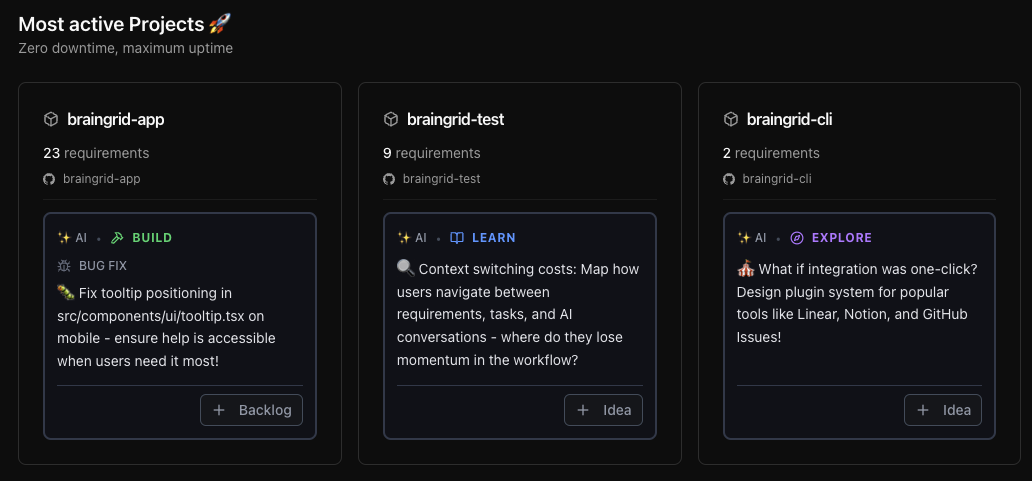
** AI Feature & Bug Fix Recommendations** - You now get AI-powered recommendations on what to build next. BrainGrid will recommend features, bug fixes, ideas, and deep dives to learn about your codebase, including:
* "Did you know" insights about your codebase
* Features mapped to customer value
* Bug fixes affecting the user experience
* Ideas to brainstorm and explore
 ***
** Complete build workflow guide** - New Build tab provides an 8-step development flow from setup through deployment:
* Step-by-step instructions for opening AI agents (Claude Code, Cursor, etc.)
* Git commands with copy buttons for branching, committing, and pushing
* BrainGrid MCP integration guidance with official documentation links
* Dynamic content using your actual requirement IDs, titles, and branch names
* Acceptance criteria validation and deployment checklists
* Works for both technical and non-technical team members
***
## Improvements
* **Smarter idea agent** - Idea agent now suggests the simplest implementation first, to prevent over-engineering. Emphasizes code reuse and progressive complexity - build the MVP, then add features when needed.
***
## Fixes
* **Better analysis status visibility** - Fixed color contrast issues in analysis status indicators for better readability in both light and dark modes. Status colors now use semantic design tokens that adapt to your theme.
***
## New Features
** Ideas workflow** - Not every requirement is ready to build immediately. The new Ideas status and dedicated Ideas tab give you a space to capture possibilities before committing to development:
* Collect feature concepts and user requests as Ideas
* Validate the technical feasibility of the idea
* Refine and discuss them before they hit your backlog
* Move to Backlog when ready to build
* Keep your active backlog focused on ready-to-build work
***
** Complete build workflow guide** - New Build tab provides an 8-step development flow from setup through deployment:
* Step-by-step instructions for opening AI agents (Claude Code, Cursor, etc.)
* Git commands with copy buttons for branching, committing, and pushing
* BrainGrid MCP integration guidance with official documentation links
* Dynamic content using your actual requirement IDs, titles, and branch names
* Acceptance criteria validation and deployment checklists
* Works for both technical and non-technical team members
***
## Improvements
* **Smarter idea agent** - Idea agent now suggests the simplest implementation first, to prevent over-engineering. Emphasizes code reuse and progressive complexity - build the MVP, then add features when needed.
***
## Fixes
* **Better analysis status visibility** - Fixed color contrast issues in analysis status indicators for better readability in both light and dark modes. Status colors now use semantic design tokens that adapt to your theme.
***
## New Features
** Ideas workflow** - Not every requirement is ready to build immediately. The new Ideas status and dedicated Ideas tab give you a space to capture possibilities before committing to development:
* Collect feature concepts and user requests as Ideas
* Validate the technical feasibility of the idea
* Refine and discuss them before they hit your backlog
* Move to Backlog when ready to build
* Keep your active backlog focused on ready-to-build work
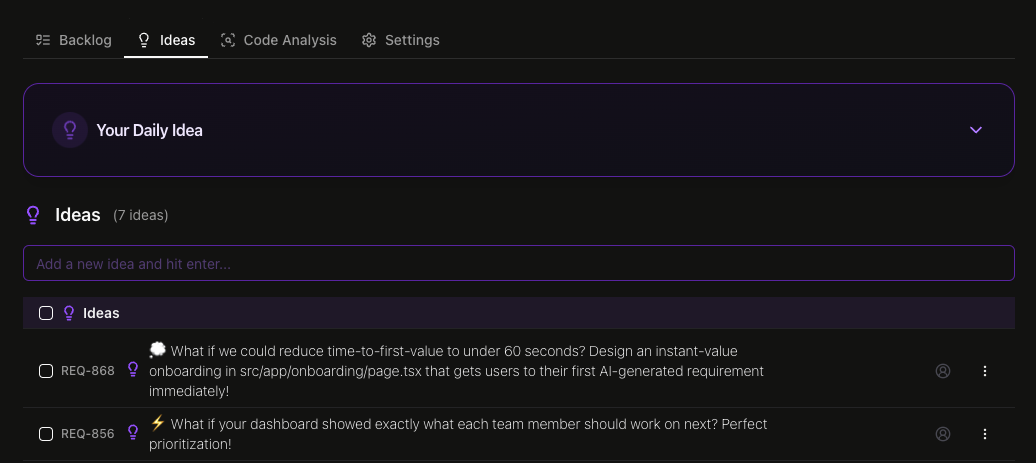 → Click on a [Project](https://braingrid.link/app), then go to the "Ideas" tab to create your first idea.
***
** Requirement mentions** - Reference specific requirements using `@` syntax to bring another requirement into context:
* Type `@` followed by requirement ID or name in agent chat
* Useful when breaking down large features into smaller requirements
* Useful when a new requirement depends on another one that is not yet built
→ Click on a [Project](https://braingrid.link/app), then go to the "Ideas" tab to create your first idea.
***
** Requirement mentions** - Reference specific requirements using `@` syntax to bring another requirement into context:
* Type `@` followed by requirement ID or name in agent chat
* Useful when breaking down large features into smaller requirements
* Useful when a new requirement depends on another one that is not yet built
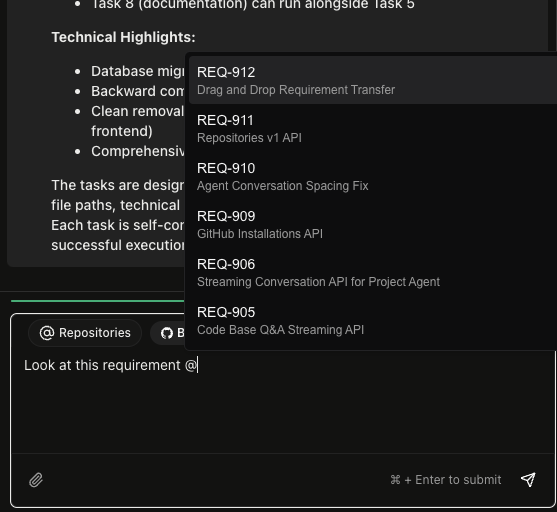 → Click on a [Project](https://braingrid.link/app), create a new requirement, and use the `@` syntax to mention another requirement.
***
** Project deletion** - Clean up old projects or remove test data safely:
* Organization owners can delete projects from settings
* GitHub-style "Danger Zone" shows exactly what will be deleted
* Preview includes requirements, tasks, and other project data
* Must type project name to confirm deletion
* Prevents accidental deletions while giving you control
***
## Improvements
** Automatic code analysis** - Creating a new project with a repository? Code analysis now starts automatically in the background. Within a few minutes, you'll have architecture summaries, directory structures, and other analysis documents available without manually triggering the analysis. This saves a step and ensures your project documentation is ready when you need it.
***
## New Features
** Projects** - Requirements now automatically organize into projects based on your repositories:
* Each repository gets its own project with sequential IDs (PROJ-1, PROJ-2, etc.)
* Easy to identify work by codebase at a glance
* Requirements without a repo link go to your organization's default project
* Project pages show only relevant requirements for that repository
* No more manual filtering or searching through unrelated work
→ Click on a [Project](https://braingrid.link/app), create a new requirement, and use the `@` syntax to mention another requirement.
***
** Project deletion** - Clean up old projects or remove test data safely:
* Organization owners can delete projects from settings
* GitHub-style "Danger Zone" shows exactly what will be deleted
* Preview includes requirements, tasks, and other project data
* Must type project name to confirm deletion
* Prevents accidental deletions while giving you control
***
## Improvements
** Automatic code analysis** - Creating a new project with a repository? Code analysis now starts automatically in the background. Within a few minutes, you'll have architecture summaries, directory structures, and other analysis documents available without manually triggering the analysis. This saves a step and ensures your project documentation is ready when you need it.
***
## New Features
** Projects** - Requirements now automatically organize into projects based on your repositories:
* Each repository gets its own project with sequential IDs (PROJ-1, PROJ-2, etc.)
* Easy to identify work by codebase at a glance
* Requirements without a repo link go to your organization's default project
* Project pages show only relevant requirements for that repository
* No more manual filtering or searching through unrelated work
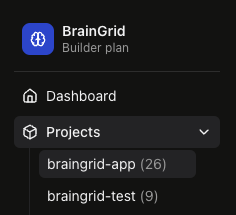 → Create your first [Project](https://braingrid.link/app).
***
** Bulk operations** - Select multiple requirements and update them together instead of one-by-one:
* Change status of 10 items from "Planned" to "In Progress" at once
* Assign a batch of requirements to the same person
* Move a group to a different project
* Update tags or other properties across multiple items
* Smart confirmation dialogs show exactly what's changing before you commit
***
## New Features
** GitHub code search** - Large codebases often have similar patterns implemented multiple times. The agent can now search across your GitHub repositories to find existing implementations, helping you maintain consistency and avoid reinventing solutions. Need to see how authentication is handled elsewhere? Search for "auth token" to find all the relevant code. Includes language filtering so you can narrow results to Python when working on Python features. The search respects GitHub's rate limits with smart retry logic.
***
** Branch-specific file reading** - Sometimes you need to see how code worked in a previous release, or compare implementations across branches. The agent's GitHub file tools now accept a `ref` parameter, letting you read files from any branch, tag, or commit - not just the default branch. Want to see how authentication worked in release v1.2? Just specify the tag. This works with both authenticated repositories and public repos you have access to.
***
## Improvements
** 400k context window** - The context window is now 400k tokens, up from 200k. Think of the context window like the agent's working memory - it's how much information it can consider at once. Doubling this means the agent can handle much larger codebases and longer conversations without losing track of earlier context. You'll especially notice this when working with monorepos or having extended back-and-forth discussions about complex requirements. The agent maintains full awareness of your entire conversation history and codebase structure.
***
## Improvements
** Precise requirement editing** - The agent can now make surgical edits to your requirements with the new `update_requirement` tool. Instead of rewriting entire documents, it makes targeted line-by-line changes and shows exactly what changed: "Successfully made 3 changes" or "No changes made."
***
** Cleaner question flow** - When the agent generates clarifying questions, it now stops right there instead of continuing. Makes the conversation feel more natural when gathering requirements.
***
## New Features
** AI-powered PR acceptance reviews** - An easy way to know if the agent is done. The new [MCP tool](https://docs.braingrid.ai/mcp-server/usage#acceptance-review-on-a-pull-request) validates pull requests against a requirement's acceptance criteria to know if it is done done.
→ Create your first [Project](https://braingrid.link/app).
***
** Bulk operations** - Select multiple requirements and update them together instead of one-by-one:
* Change status of 10 items from "Planned" to "In Progress" at once
* Assign a batch of requirements to the same person
* Move a group to a different project
* Update tags or other properties across multiple items
* Smart confirmation dialogs show exactly what's changing before you commit
***
## New Features
** GitHub code search** - Large codebases often have similar patterns implemented multiple times. The agent can now search across your GitHub repositories to find existing implementations, helping you maintain consistency and avoid reinventing solutions. Need to see how authentication is handled elsewhere? Search for "auth token" to find all the relevant code. Includes language filtering so you can narrow results to Python when working on Python features. The search respects GitHub's rate limits with smart retry logic.
***
** Branch-specific file reading** - Sometimes you need to see how code worked in a previous release, or compare implementations across branches. The agent's GitHub file tools now accept a `ref` parameter, letting you read files from any branch, tag, or commit - not just the default branch. Want to see how authentication worked in release v1.2? Just specify the tag. This works with both authenticated repositories and public repos you have access to.
***
## Improvements
** 400k context window** - The context window is now 400k tokens, up from 200k. Think of the context window like the agent's working memory - it's how much information it can consider at once. Doubling this means the agent can handle much larger codebases and longer conversations without losing track of earlier context. You'll especially notice this when working with monorepos or having extended back-and-forth discussions about complex requirements. The agent maintains full awareness of your entire conversation history and codebase structure.
***
## Improvements
** Precise requirement editing** - The agent can now make surgical edits to your requirements with the new `update_requirement` tool. Instead of rewriting entire documents, it makes targeted line-by-line changes and shows exactly what changed: "Successfully made 3 changes" or "No changes made."
***
** Cleaner question flow** - When the agent generates clarifying questions, it now stops right there instead of continuing. Makes the conversation feel more natural when gathering requirements.
***
## New Features
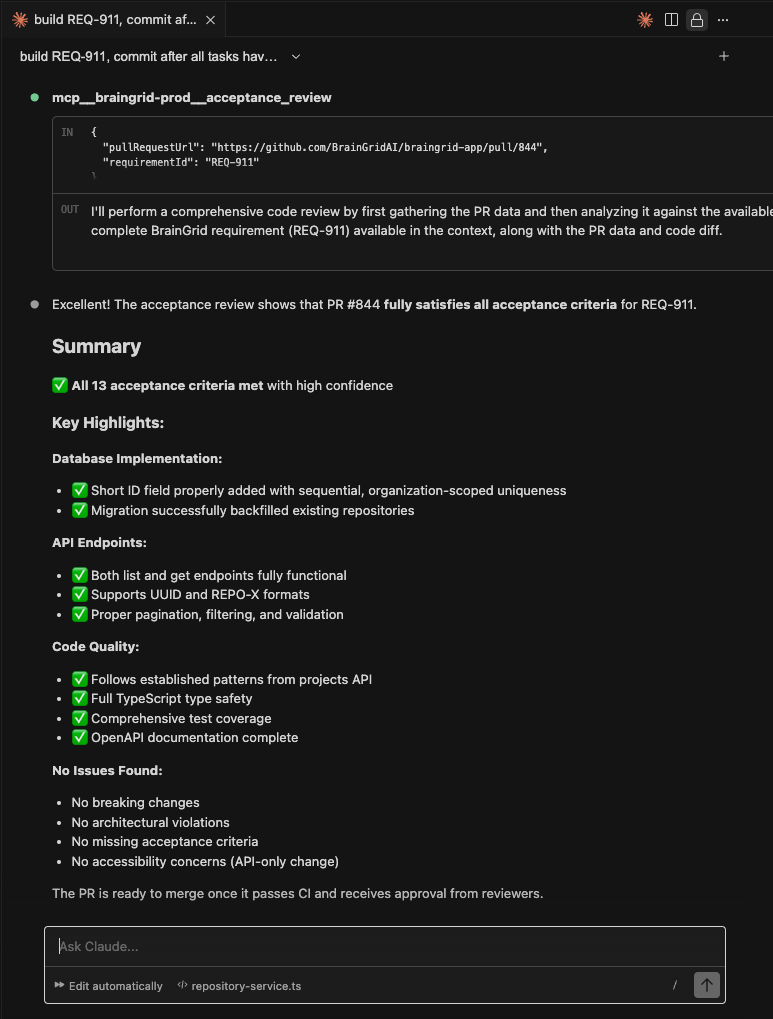
** AI-powered PR acceptance reviews** - An easy way to know if the agent is done. The new [MCP tool](https://docs.braingrid.ai/mcp-server/usage#acceptance-review-on-a-pull-request) validates pull requests against a requirement's acceptance criteria to know if it is done done.
 ***
## New Features
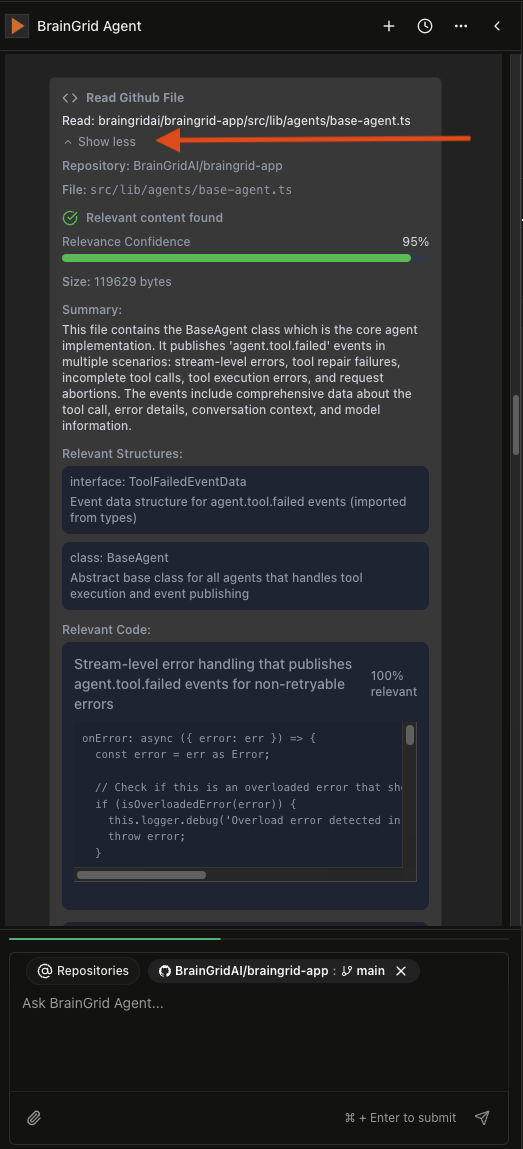
** Smart file summarization** - BrainGrid now intelligently summarizes the files it reads. It is great to learn what a specific file does and what are the key parts and integration points. Just click the "Show more" any time the agent reads a file.
***
## New Features
** Smart file summarization** - BrainGrid now intelligently summarizes the files it reads. It is great to learn what a specific file does and what are the key parts and integration points. Just click the "Show more" any time the agent reads a file.
 ***
** Massive performance boost for code analysis** - We spent a week making analysis 10x faster.
***
## Improvements
** Repository dropdown that makes sense** - Full repo names visible (`owner/repo`) for easier repository identification.
***
## New Features
** Multiple GitHub organizations** - Connect up to 5 GitHub orgs to one BrainGrid account.
***
** Redesigned feedback page** - New streamlined feedback form for easier submission.
***
** Dedicated Agent integrations page** - All your integrations now live in their own space. Less clutter, more focus.
***
## Improvements
** Tool error recovery** - Tools that fail now gracefully recover and retry automatically.
***
## New Features
** Requirement validation tool** - New MCP tool validates requirements against their acceptance criteria. Catch issues before they become problems.
***
## Improvements
** Instant tool feedback** - Agent tool cards now appear immediately instead of after processing.
***
** Web page caching** - Repeated webpage reads are now cached for 10x faster performance.
***
## New Features
** Web search** - BrainGrid can now search the internet for current information. Documentation moved? API changed? No problem - we'll find the latest.
***
** Read any webpage** - Give BrainGrid a URL and it extracts the content, understands it, and uses it in your requirements.
***
## Improvements
** Workflow-aware requirements** - BrainGrid now understands whether you are creating requirements from scratch, refining an existing requirements doc, or breaking an existing requirement into tasks.
***
## New Features
** Image support** - You can now share screenshots, designs, and diagrams with the BrainGrid agent for more visual collaboration.
***
** Refine existing PRDs** - Upload your existing PRDs in markdown format to enhance them and get them AI-ready before you start building.
***
** Smart context compaction** - Long conversations with large repos now use intelligent context management, so the agent maintains performance without running out of context window.
***
## Improvements
** Faster code analysis** - Code analysis now runs 2-5x faster, making a huge difference for large repositories. Your feedback helped us optimize this!
***
** Reasoning agent** - BrainGrid now shows its "thinking" process, making it more transparent and capable of handling complex planning and specification challenges.
***
** Massive performance boost for code analysis** - We spent a week making analysis 10x faster.
***
## Improvements
** Repository dropdown that makes sense** - Full repo names visible (`owner/repo`) for easier repository identification.
***
## New Features
** Multiple GitHub organizations** - Connect up to 5 GitHub orgs to one BrainGrid account.
***
** Redesigned feedback page** - New streamlined feedback form for easier submission.
***
** Dedicated Agent integrations page** - All your integrations now live in their own space. Less clutter, more focus.
***
## Improvements
** Tool error recovery** - Tools that fail now gracefully recover and retry automatically.
***
## New Features
** Requirement validation tool** - New MCP tool validates requirements against their acceptance criteria. Catch issues before they become problems.
***
## Improvements
** Instant tool feedback** - Agent tool cards now appear immediately instead of after processing.
***
** Web page caching** - Repeated webpage reads are now cached for 10x faster performance.
***
## New Features
** Web search** - BrainGrid can now search the internet for current information. Documentation moved? API changed? No problem - we'll find the latest.
***
** Read any webpage** - Give BrainGrid a URL and it extracts the content, understands it, and uses it in your requirements.
***
## Improvements
** Workflow-aware requirements** - BrainGrid now understands whether you are creating requirements from scratch, refining an existing requirements doc, or breaking an existing requirement into tasks.
***
## New Features
** Image support** - You can now share screenshots, designs, and diagrams with the BrainGrid agent for more visual collaboration.
***
** Refine existing PRDs** - Upload your existing PRDs in markdown format to enhance them and get them AI-ready before you start building.
***
** Smart context compaction** - Long conversations with large repos now use intelligent context management, so the agent maintains performance without running out of context window.
***
## Improvements
** Faster code analysis** - Code analysis now runs 2-5x faster, making a huge difference for large repositories. Your feedback helped us optimize this!
***
** Reasoning agent** - BrainGrid now shows its "thinking" process, making it more transparent and capable of handling complex planning and specification challenges.